How to create a new photo album

How to create a new photo album on an iPhone iPad/iPhone tip: How to create a new photo album (updated)Want to organize the pile of snapshots sitting in your iPhone’s camera roll? Try this: just create a new album or two, then start sorting.
There are actually a couple of ways to make a photo album on your iPhone or iPad: one is to create a new, empty album and then start adding photos to it, while the other is to select one or more images first and then create a new album.
Add iPhone photos to a new album 300x250 iPad/iPhone tip: How to create a new photo album (updated)
Just tap the photos you want to add to a new album, then tap the “Add To” button.

Here’s how to get started…
  • Let’s begin by selecting some photos and adding them into a new album. Tap the Photos icon from your iPhone’s or iPad’s home screen, tap the Albums tab, select Camera Roll, then tap the Edit button.
  • Now, it’s time to pick some photos. Tap a few—as many as you like—then press the “Add To” button at the bottom (on an iPhone) or top (on an iPad) of the screen.
  • Next, an “Add to New Album” button will appear. Go ahead and tap it, then type a name for your album in the pop-up window. If you’ve already created some new photos albums on your iPhone/iPad, you’ll see an “Add to Existing Album” button in addition to “Add to New Album.”
  • Finally, tap the “Save” button, and voilà—your new photo album will appear at the bottom of the Album list.
Want to create a new album first and then start adding photos to it? No problem.
  • From the Album screen, tap the “+” button sitting on the top-left corner of the screen.
  • Name your new photo album and tap “Save.”
  • If you’re using an iPad, you’ll next see a screen of images from your Camera Roll; tap to select photos to add to your new album, then tap the Done button when you’re finished.
  • On an iPhone, tap a photo album from the list that appears, then start tapping photos to add to your new album. You can also pick and choose from your Photo Stream by tapping the Photo Stream tab at the bottom of the screen.

Bonus tip

You can rearrange or delete photo albums on the iPhone by tapping the Edit button on the Albums screen. On the iPad, just tap, hold, and drag a photo album to rearrange it, or tap the Edit button and tap the little “x” on an album to delete it.
Oh, and one more thing: Keep in mind that you can delete an album without trashing the photos inside it.
Source http://heresthethingblog.com
How to create a new photo album
Read More..

New APK Market iMarketApk » MyRoll Gallery Photo Gallery v3 2 6 9

MyRoll Gallery - Photo Gallery v3.2.6.9

Requirements

http://iMarketApk.blogspot.com/ [New] APK Market iMarketApk » MyRoll Gallery - Photo Gallery v3.2.6.9 [Torrent Modded apk] Free APK are available on every other topic you can think of in both fiction and non-fiction of. There are free Android APK available for adults and children and even between and teenagers. It may seem overwhelming to find and download [android apk] Hack no survey [New] APK Market iMarketApk » MyRoll Gallery - Photo Gallery v3.2.6.9 ҩ MOD but with the steps below youll be just minutes away from getting APK.: Android 4.0+

http://iMarketApk.blogspot.com/ - Overview about MyRoll Gallery - Photo Gallery v3.2.6.9

Full Download MOd [New] APK Market iMarketApk » MyRoll Gallery - Photo Gallery v3.2.6.9 and Torrent Link

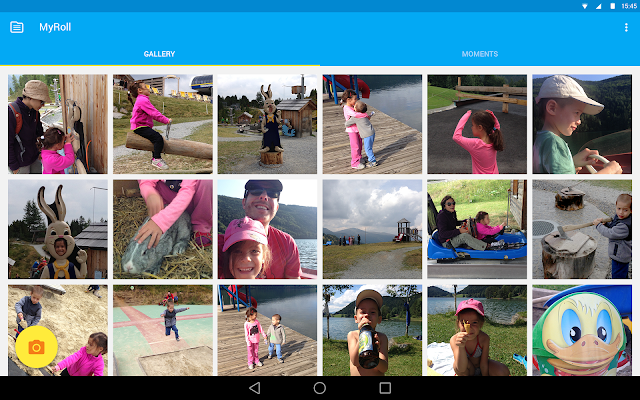
: Meet MyRoll Gallery, the fastest growing photo gallery app for Android and the first ever gallery for Android Wear.

The only Gallery chosen as one of the Top 100 Apps worldwide, MyRoll Gallery is a free, next generation photo gallery that’s a complete replacement to your native gallery.

Missing your photo gallery in Android 5.0 Lollipop? Dont worry - our gallery is Android 5.0 ready. MyRoll Gallery is the only gallery for Android L that you’ll need, fully optimized for Android 5.0 Lollipop on all devices including Nexus 4 and Nexus 5.

With MyRoll Gallery, you can:

ORGANIZE YOUR PHOTO GALLERY

• Automatically organize all of your photos and videos according to your events, date, time, and location.

• For the classic photo gallery feel, the Gallery view has all of your photos and videos in one reel.

• Use the Moments view for a more unique, collage like view based around events, date, and location.

SHARE

• Easily share groups of photos and videos from your gallery, with just a tap!

• Share with ease to all of your favorite social networks: WhatsApp, Facebook, G+, Line, Kakao, WeChat, and more.

• The easiest and fastest way to create Facebook albums, on the fly!

DISCOVER & PERSONALIZE

• Intelligent notifications - Have MyRoll Gallery help you rediscover those photos from your trip abroad last month, your kids’ birthday last year, or any important memory that’s been lost in your photo gallery.

• Automatically identify your best photos in your gallery - ones with smiling faces, great lighting, vibrant color, and more.

THE FIRST GALLERY FOR ANDROID WEAR

MyRoll Gallery offers the first ever photo gallery created for smartwatches. With MyRoll Gallery on Android Wear, you can:

• View or Delete your photos - all from your smartwatch!

• Share photos directly to Facebook, on the fly.

• Photo Notifications - Easily access your latest photos from your gallery with just a tap.

More Info MyRoll Gallery - Photo Gallery v3.2.6.9

You can directly download the apk file with torent modded or just in iMarketApk

Android APK Files [New] APK Market iMarketApk » MyRoll Gallery - Photo Gallery v3.2.6.9 Full And No Hack No Survey No ROOT

https://play.google.com/store/apps/d...r.flayvr&hl=pl

Download Instructions:

Download Url

Read More..

New APK Market iMarketApk » PicsArt Photo Studio FULL v5 1 1

PicsArt - Photo Studio FULL v5.1.1

Requirements

http://iMarketApk.blogspot.com/ [New] APK Market iMarketApk » PicsArt - Photo Studio FULL v5.1.1 [Torrent Modded apk] Free APK are available on every other topic you can think of in both fiction and non-fiction of. There are free Android APK available for adults and children and even between and teenagers. It may seem overwhelming to find and download [android apk] Hack no survey [New] APK Market iMarketApk » PicsArt - Photo Studio FULL v5.1.1 ҩ MOD but with the steps below youll be just minutes away from getting APK.: Varies with device

http://iMarketApk.blogspot.com/ - Overview about PicsArt - Photo Studio FULL v5.1.1

Full Download MOd [New] APK Market iMarketApk » PicsArt - Photo Studio FULL v5.1.1 and Torrent Link

: PicsArt combines the best features of many photo applications it is one of best and most complete photo editors available for free in the market for Android devices.

Free APK PicsArt - Photo Studio FULL v5.1.1

With 200 million installs across all platforms, PicsArt is the go-to photo editing and drawing app with a rapidly growing community of creatives.

Constantly discover new ways to unleash your inner artist while you create, share, and connect with this all-in-one app and social network.

According to the leading tech magazines, "PicsArt transforms your smartphone pictures into works of art.” (Mashables) and "... a functionality close to what you get on expensive professional tools like Photoshop. But PicsArt is free and requires no instructions or training." (Fast Company)

PicsArt includes tools and features such as:

One of the world’s largest virtual galleries where you can discover inspiring images and be discovered as an artist

An easy-to-use photo editor, providing a wide array of photo manipulation tools such as a clone tool, crop tool, and enhancement tool, and hundreds of customizable effects, masks, shape masks, text tool, and more

Instant sharing on PicsArt, Facebook, Twitter, Instagram, Dropbox, or via email

A collage maker allowing you to create collages in photo grids, collage frames, free-form, or with photos in the background

A drawing suite, with abundant features including artistic brushes and layers to create mobile images that look like real paintings

Contests on photography, photo editing, drawing, and graphic design

A large gallery of public images for co-editing

Over 2,000 free thematic clipart images, frames, and collage frames to choose from

Much more for you to explore once you download your ultimate photo app

WHATS NEW

* Add People- Tagging made easier. Quick access to your favorite tags right from the upload screen

* Double Tap to Like- Notice a picture you like while browsing image galleries? Double tap to like it then and there!

* High Resolution Support- Doubled resolution for images within PicsArt, we have gone from supporting 4 megapixels to 8.

* Gif Animation Upload and Preview

This app has no advertisements

More Info PicsArt - Photo Studio FULL v5.1.1

You can directly download the apk file with torent modded or just in iMarketApk

Android APK Files [New] APK Market iMarketApk » PicsArt - Photo Studio FULL v5.1.1 Full And No Hack No Survey No ROOT

:

https://play.google.com/store/apps/d...picsart.studio

Download Instructions: PREMIUM features Unlocked

Download Url

Mirrors:

Download Url

Download Url

Read More..

How to shrink a photo before sending it via email

Shrink an iPad photo before sending it via email iPad tip: How to shrink a photo before sending it via emailSandra writes: I sent a photo from my iPad to my Virgin email. The photo came out very large even though it was a JPEG. Could you please advise what I can do [to make it smaller]? The iPad is an iPad 3.
Hi Sandra! I must admit, I was a little puzzled when I first read your question.
After all, doesn’t the iPad automatically ask you whether you’d like to shrink a large, about-to-be-emailed photo, just like the iPhone does?
I gave it a try with my own iPad 3, and lo and behold: no pop-up asking if I really want to send a massive, multi-megabyte photo as an email attachment.
Instead, my iPad just pasted the full-size snapshot (1.3 megabytes, to be exact) into my email message and sent it, no questions asked.
Image Size settings for email on iPad 300x165 iPad tip: How to shrink a photo before sending it via email
Yes, you can shrink a photo before sending it via email on the iPad, provided you know where to tap.
So, what gives?
Well, it turns out you can reduce the size of a photo attachment before hitting the “Send” button, provided you know where to tap.
Here’s how…
  • First, let’s dive into the iPad’s Camera Roll in the Photos app, and find a great snapshot to send as an email attachment. Got one? Tap the Share button (it’s the one in the top-right corner of the screen, with a curved arrow), then tap the Mail icon.
  • Your iPad will automatically paste your photo (or photos, if you selected more than one) into a blank email message. Go ahead and fill in the “To:” and “Subject” lines, and add a message in the body of the email if you wish.
  • Now, here’s the trick: see the “CC/BCC” line, just below the “To” line? Look over to the right, and you’ll see a little text that reads “Images: 1.3 MB” (the size will vary depending on the image). Tap the “CC/BCC” line to expand it—and suddenly, you’ll see a series of four “Image Size” options: Small, Medium, Large, and Actual Size. Tap one of the buttons to shrink the photo down to size.
  • All set? Go ahead and tap the “Send” button.
How to shrink a photo before sending it via email
Read More..

Powered by Blogger.